MASDOC SMS Opt-In
This page describes how patients opt in to SMS text messages from MASDOC. There are two opt-in paths:
- Verification codes during sign-in
- Assessment reminders during onboarding
1. Verification Codes (Sign-In)
On the "Sign in" screen, the user selects "Phone", enters their own mobile number, and taps "Continue".
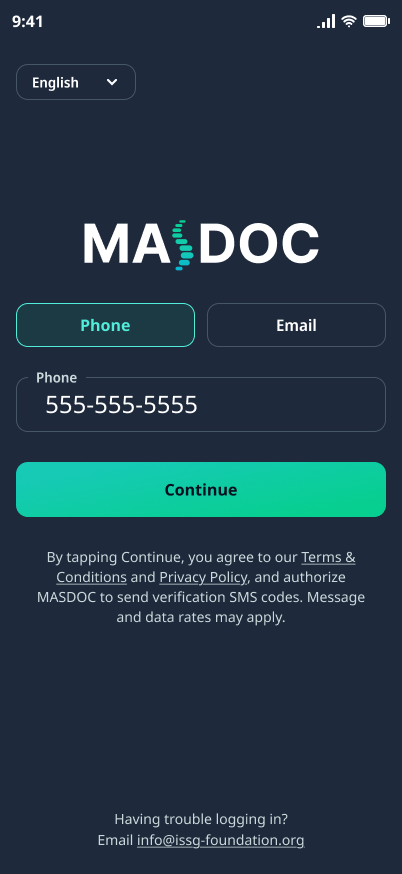
The consent language shown on this screen is exactly:
By tapping Continue, you agree to our Terms & Conditions and Privacy Policy, and authorize MASDOC to send verification SMS codes. Message and data rates may apply.
Sample message:
MASDOC sign-in code: 123456. Expires in 5 min.
2. Assessment Reminders (Onboarding)
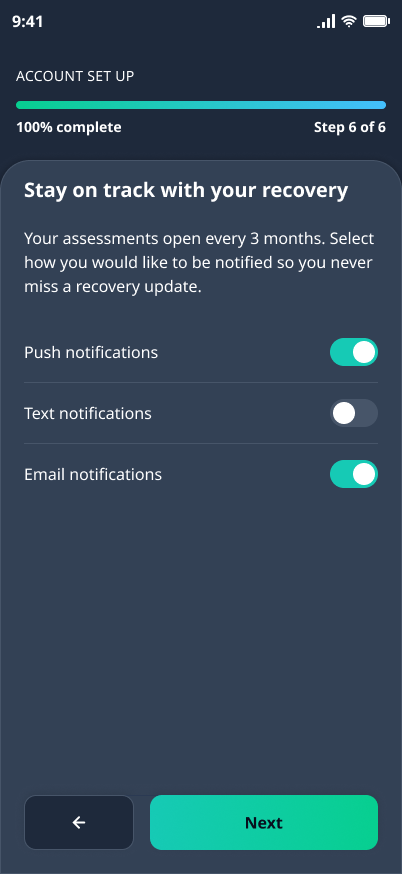
During onboarding, a notification screen offers toggles for Push, Text, and Email notifications. Text notifications are off by default and the user can turn them on knowingly, or change the choice later in Settings → Manage Notifications.
Sample message:
MASDOC: Finish your check-in to track progress.
STOP / START / HELP
- STOP to opt out of assessment reminder texts.
- START to resume reminder texts.
- HELP for assistance, or email info@issg-foundation.org.
Message frequency varies. Message and data rates may apply.
See the full SMS terms at /terms#sms and our Privacy Policy.